100W LED USB-C to USB-C Cable: MacBook & Samsung Tips

LED USB‑C to USB‑C Fast Charging Cable (100W PD/QC) for MacBook and Samsung: What to Know Before You Plug In
A USB‑C to USB‑C cable can be the difference between slow top-ups and full-power charging for laptops, tablets, and phones. This LED USB‑C to USB‑C fast charging cable supports up to 100W with Power Delivery and works well for common devices like MacBook and Samsung Galaxy—when paired with the right USB‑C charger. The result is a cleaner everyday setup: one modern cable type, clear charging status, and enough headroom for everything from a phone to a USB‑C laptop.
What This Cable Is Designed to Do
- Deliver high-wattage USB‑C charging for compatible devices, including many MacBook and Samsung models.
- Support modern fast-charging standards commonly used by USB‑C chargers (Power Delivery). QC compatibility depends on the charger and device.
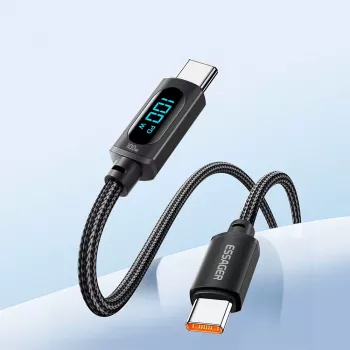
- Provide an LED indicator for quick “at-a-glance” confirmation that power is flowing—handy on desks, nightstands, and travel setups.
- Handle charging and typical USB‑C data functions; actual data speed depends on the cable build and the devices connected.
Key Features That Matter Day to Day
- Up to 100W output (commonly 20V/5A) when used with a 100W-capable USB‑C PD charger and a device that accepts that power level.
- USB‑C to USB‑C ends for modern wall chargers, power banks, laptops, tablets, and phones.
- LED charging light helps you find the cable end in low light and reduces guesswork about whether the connection is active.
- A practical spare or replacement cable for work bags, car chargers (USB‑C PD), and multi-device households.
Power Delivery vs Quick Charge: What It Means for MacBook and Samsung
Not all “fast charging” is the same. Most USB‑C laptops—including many MacBook models—rely on USB Power Delivery (USB‑C PD) to negotiate higher voltage and wattage safely. That negotiation is why reputable PD gear matters: the charger and device communicate to decide the best power profile, rather than forcing power blindly.
Samsung phones typically fast charge over USB‑C using PD-based methods (often marketed as “Super Fast Charging”) when paired with a compatible charger. Quick Charge (QC) is also common in the Android ecosystem, but real-world speed still depends on the charger’s supported protocols and the phone’s charging profile. For the standards themselves, you can reference the organizations behind them: USB-IF for USB-C and USB Power Delivery, plus Qualcomm Quick Charge for QC details.
The simple rule: fast charging performance is a three-part system—device + charger + cable. A 100W-rated cable won’t force 100W into a phone that only draws a smaller wattage, but it can provide stable delivery and reduce the chance that the cable becomes the bottleneck when you switch to higher-power devices.
Compatibility Checklist Before Buying
- For MacBook charging: use a USB‑C PD wall charger with sufficient wattage for your model (for example, 30W, 61W, 96W, or up to 100W).
- For Samsung fast charging: pair with a compatible USB‑C fast charger that supports your phone’s fast-charge mode.
- For power banks: confirm the USB‑C port supports PD output and that the power bank can supply the wattage you need.
- For monitors/docks: USB‑C ports vary—some offer charging only, some include data/video; the weakest link sets the overall capability.
Charging Speeds: Common Real-World Scenarios
Even with a 100W cable, the device controls how much power it takes. Laptops and tablets negotiate higher voltage profiles; phones usually pull far less than 100W, but still benefit from a cable built for higher current. Also note that many devices slow charging as the battery warms or nears full—this is expected behavior designed to protect battery longevity.
Quick Guide to Matching Cable, Charger, and Device
| Use case | Recommended charger type | What to expect |
|---|---|---|
| MacBook / USB‑C laptop | USB‑C PD charger (60–100W as needed) | Stable high-watt charging if the charger and laptop support it |
| Samsung Galaxy phone | USB‑C fast charger (PD-based fast charging) | Fast charging up to the phone’s supported level |
| USB‑C tablet | USB‑C PD charger (20–45W typical) | Quick top-ups during streaming, note-taking, and travel |
| Power bank output | PD-enabled power bank USB‑C port | Convenient charging on the go; speed limited by power bank output |
Durability and Safety Considerations
How to Use the LED Indicator Effectively
Common Issues and Quick Fixes
Product Options (In Stock)
- LED USB C to USB C Fast Charging Cable 100W PD QC3.0 for MacBook & Samsung — A budget-friendly choice with LED status and up to 100W capability when paired with a compatible PD charger.
- The Smart Traveler’s Guide to Global Etiquette | Digital Download eBook — A handy add-on for travel days when this cable is likely to live in your carry-on alongside chargers, adapters, and power banks.
FAQ
Will this cable charge a MacBook at full speed?
It can, as long as your MacBook model supports the wattage you’re supplying and you’re using a USB‑C PD charger rated high enough. The cable supports up to 100W when the charger and laptop negotiate that level.
Does it support Samsung fast charging?
Yes, when paired with a compatible USB‑C fast charger and a Samsung device that supports fast charging. The phone will only draw the wattage it’s designed to accept.
What does the LED light indicate?
The LED generally indicates that power is present and the connection is active. It doesn’t guarantee maximum charging speed, which is determined by the charger and device negotiation.















Leave a comment